Skip to content
  • 0 Unread 0
  • Recent
  • Tags
  • Popular
  • Users
  • Groups
  • Donate
Collapse

Plutonium

  1. Home
  2. BO2 Modding Releases & Resources
  3. [Release] [ZM] ZOMBIES++

[Release] [ZM] ZOMBIES++

Scheduled Pinned Locked Moved BO2 Modding Releases & Resources
256 Posts 108 Posters 203.3k Views 20 Watching
  • Oldest to Newest
  • Newest to Oldest
  • Most Votes
Reply
  • Reply as topic
Log in to reply
This topic has been deleted. Only users with topic management privileges can see it.
  • Cahz Cahz

    Jacobean
    blackbeard29
    Since there was some confusion on how to install this mod, I made a RAR file with the premade _clientids and a short tutorial on how to install/use. Hopefully this helps

    Link: https://github.com/Paintball/BO2-Zombies-Mod/blob/master/Zombies%2B%2B COMPILED.rar
    Virustotal: https://www.virustotal.com/gui/file/e568a1d4390b55ca54f7bf5a287d9e5c217c7ef4ef553e9c74029dab1befdbcf/detection

    _KimboSlice_ Offline
    _KimboSlice_ Offline
    _KimboSlice_
    wrote on last edited by
    #69

    Cahz error 404 not found when i open the link of the tutorial

    1 Reply Last reply
    0
    • Jacobean Jacobean

      Farzad I just copied the compiled script that Cahz posted and put it in t6r/data/maps/mp/gametypes_zm
      And put the config in t6r/data.
      Do I need to do more than this?
      https://prnt.sc/s3m9iz

      _KimboSlice_ Offline
      _KimboSlice_ Offline
      _KimboSlice_
      wrote on last edited by
      #70

      Jacobean t6r/data/maps/mp/gametypes_zm dont appear on my files what can i do? create them?

      luigistyle 1 Reply Last reply
      1
      • Cahz Cahz

        ZOMBIES ++ MOD
        Developer: @ItsCahz
        Link: https://github.com/Paintball/BO2-GSC-Releases/tree/master/Zombies Mods/Zombies%2B%2B/v1.2
        Hello guys, I'm bringing you guys my variation of Zombies that I've been working on for a bit. Basically this is supposed to enhance the vanilla BO2 zombies and make it better. There's so many things that I need to cover.

        README
        All of the important functions can be toggled on and off inside of the dedicated_zm.cfg file or by utilizing set <dvarName> <value>. Almost no need to go and edit the GSC.

        TOGGLE-ABLE FEATURES

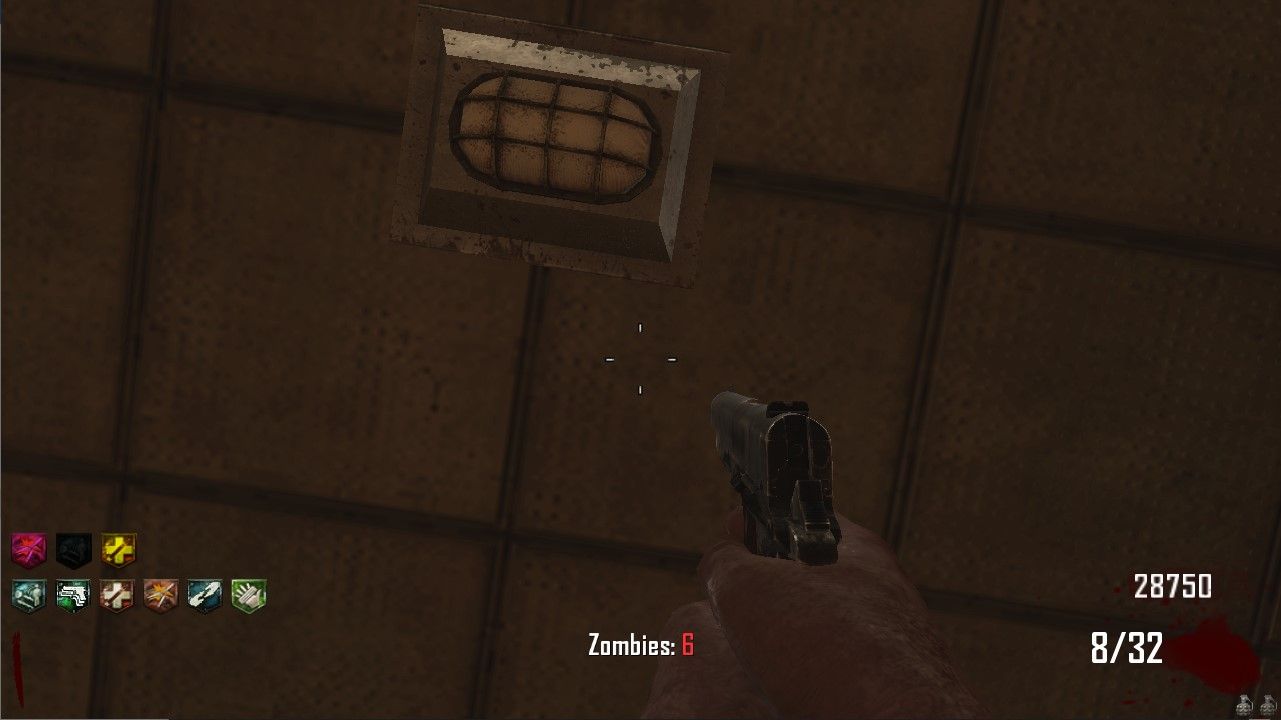
        • Zombie Counter on screen
        • Custom Powerup drops
        • Extra Perk Machines

        CUSTOM POWERUPS

        • Money Drop (Random amount of money)
        • Pack-A-Punch (Upgrade the current weapon of player) (this is super OP)
        • Unlimited Ammo (Probably the best one. Credit @_Ox)
        • Fast Feet (Super sonic speed)

        EXTRA PERK MACHINES

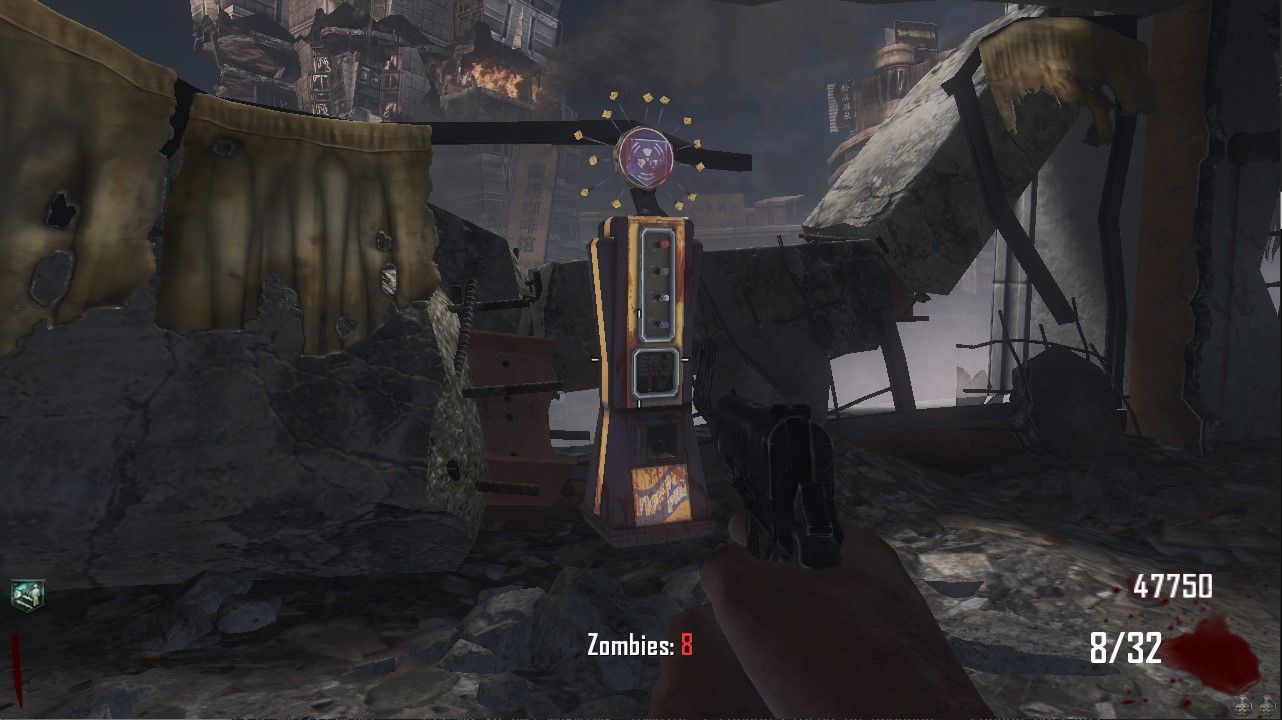
        • PHD Flopper (Nuketown, Tranzit, Buried, MOTD, Die Rise) (NO SPLASH DMG AND NO FALL DMG)
        • Stamin-Up (Nuketown)
        • Mule Kick (Nuketown, Tranzit)
        • Deadshot Daiquiri (Nuketown, Tranzit, Buried)

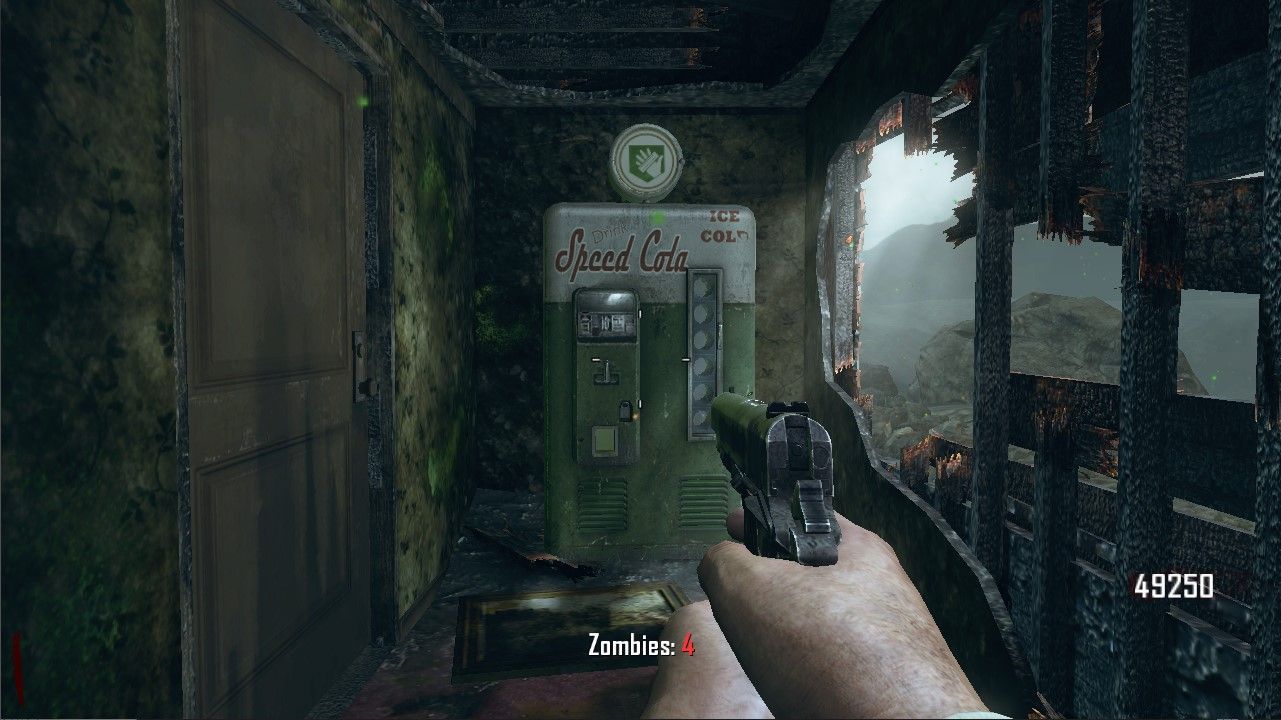
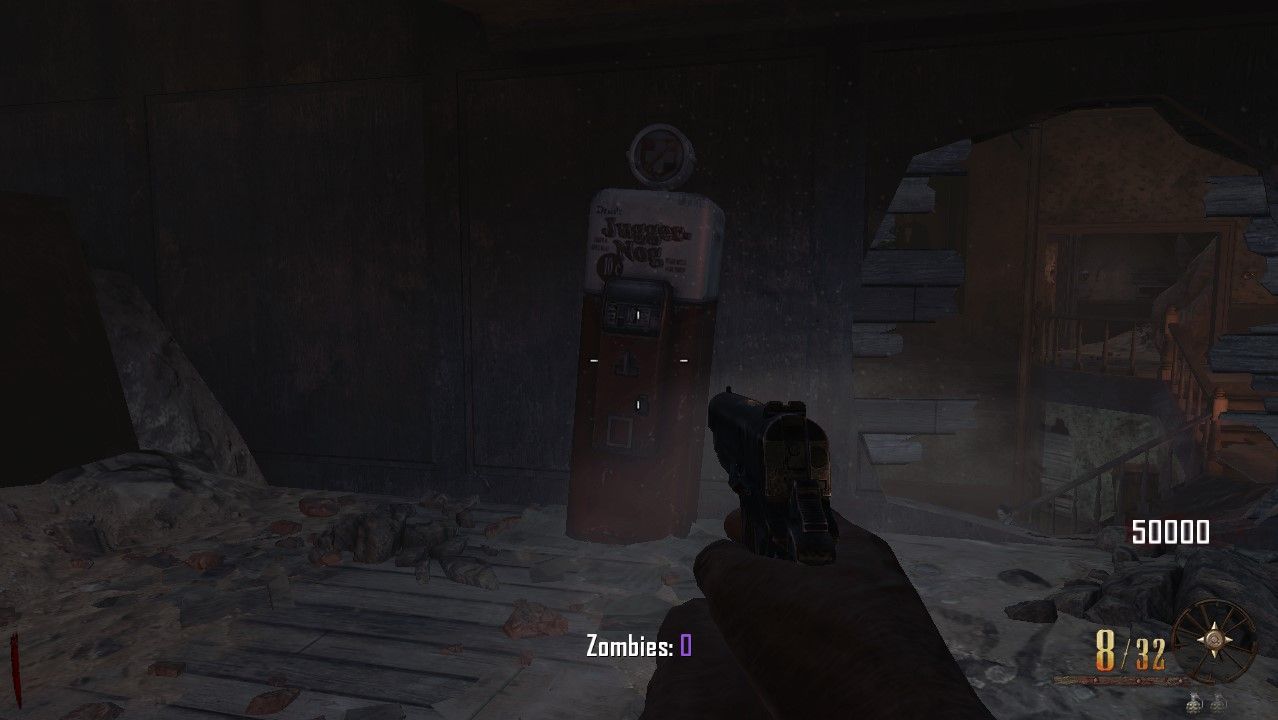
        Note: I cannot use the models of things that are not on the map already. Luckily maps like MOTD and Die Rise have assets I could use for PHD Flopper. But other custom perk machines will be using the Quick Revive model, Juggernog model, Speedcola model, and the Doubletap model. This also goes for the custom perk icons on the hud. Had to use already on the map icons.

        OTHER FEATURES

        • Force Spawn players on Round 1 (No more having friends spectating until Round 2)

        • Game Length gets displayed at the end of the game (hours and minutes)

        Some Pictures
        I wanted the perk machine locations to be in spots that would not normally be used, so exploring the entire map should result in finding them.
        DIERISE_PHD.jpg
        My favorite perk and perk machine!
        all perks die rise.jpg
        All perks for Die Rise. (PHD Flopper, Deadshot, and Staminup)
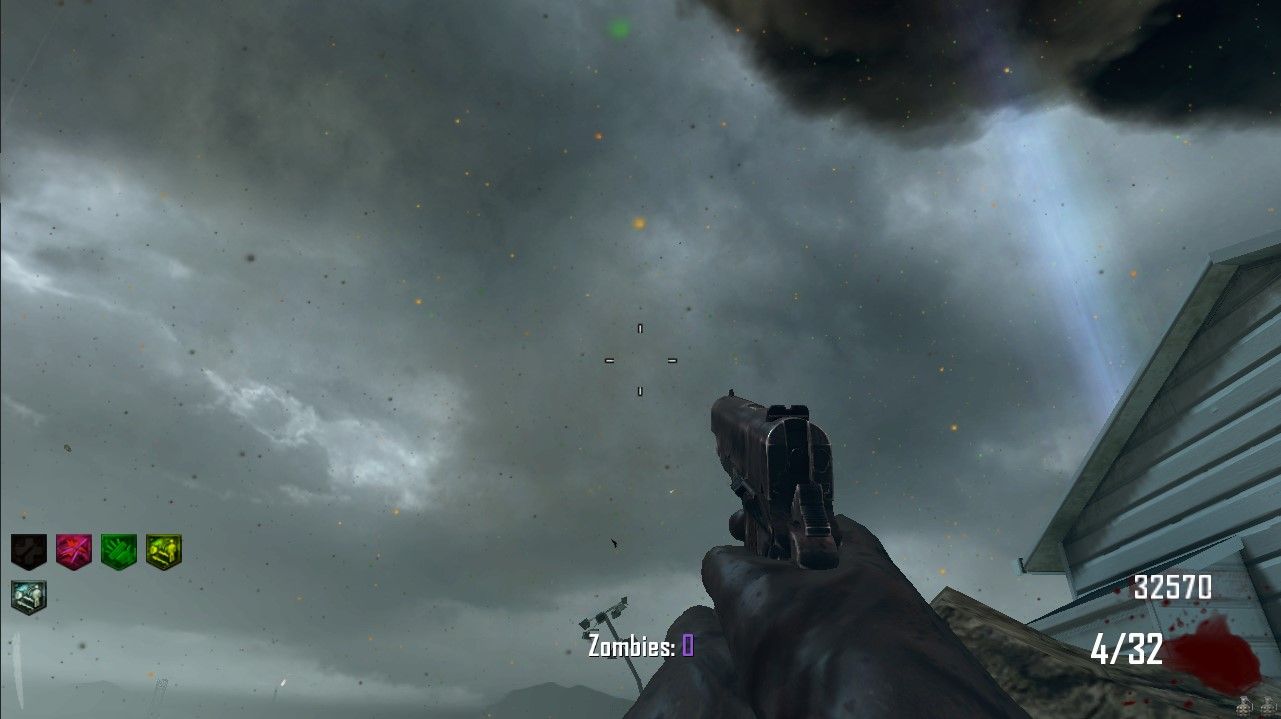
        custom perks.jpg
        Nuketown All extra Perks (PHD Flopper, Deadshot, Staminup, and Mule Kick)
        MOTD_PHD.jpg
        MOTD PHD Flopper Machine!
        NUKETOWN_MULEKICK.jpg
        Nuketown Mule Kick
        BURIED_PHD.jpg
        BURIED PHD FLOPPER (back of witches house. have to go tunnel way instead of fountain)
        I don't think there's much else to say here other than have fun

        Version 1.2
        should be more stable. Won't know until server owners test it.

        twistedfun Offline
        twistedfun Offline
        twistedfun
        wrote on last edited by
        #71

        Cahz bruh none of the downloads are working and i also have no firefox so i cant do any of that other stuff

        1 Reply Last reply
        0
        • _KimboSlice_ _KimboSlice_

          Jacobean t6r/data/maps/mp/gametypes_zm dont appear on my files what can i do? create them?

          luigistyle Offline
          luigistyle Offline
          luigistyle
          Plutonium Staff
          wrote on last edited by
          #72

          @SlaaayZ Correct.

          1 Reply Last reply
          1
          • So High Offline
            So High Offline
            So High
            wrote on last edited by
            #73

            that zombie blood fix would be comin in clutch tho

            Cahz 1 Reply Last reply
            0
            • So High So High

              that zombie blood fix would be comin in clutch tho

              Cahz Offline
              Cahz Offline
              Cahz
              VIP
              wrote on last edited by
              #74

              @Hobo-Tim Should be fixed now.. Download the latest version and let me know (i didnt feel like testing)

              LastKing 1 Reply Last reply
              0
              • Cahz Cahz

                UnknownAU Not sure how it doesn't work... Works fine for me

                LastKing Offline
                LastKing Offline
                LastKing
                wrote on last edited by
                #75

                Cahz ZombieBlood Does Not Work. UnforTunately Not Working .
                cahz is owner but there is this probloem for a month ago , i dont know why he does not fix That !!!!!!!!!!

                1 Reply Last reply
                0
                • Cahz Cahz

                  @Hobo-Tim Should be fixed now.. Download the latest version and let me know (i didnt feel like testing)

                  LastKing Offline
                  LastKing Offline
                  LastKing
                  wrote on last edited by
                  #76

                  Cahz Yeah I Compiled YOur New Cod After running server , i Have this Error :
                  **** 1 script error(S):
                  ****unrseloved external "test the powerup" 0 parameters in myfile at line 1 ****
                  i think there is a wrong code at zm_custom_powerups.gsc file in the 24 line

                  Cahz MrWave 2 Replies Last reply
                  0
                  • LastKing LastKing

                    Cahz Yeah I Compiled YOur New Cod After running server , i Have this Error :
                    **** 1 script error(S):
                    ****unrseloved external "test the powerup" 0 parameters in myfile at line 1 ****
                    i think there is a wrong code at zm_custom_powerups.gsc file in the 24 line

                    Cahz Offline
                    Cahz Offline
                    Cahz
                    VIP
                    wrote on last edited by
                    #77

                    LastKing Try now buddy should be fixed 🙂

                    MrWave LastKing 2 Replies Last reply
                    0
                    • LastKing LastKing

                      Cahz Yeah I Compiled YOur New Cod After running server , i Have this Error :
                      **** 1 script error(S):
                      ****unrseloved external "test the powerup" 0 parameters in myfile at line 1 ****
                      i think there is a wrong code at zm_custom_powerups.gsc file in the 24 line

                      MrWave Offline
                      MrWave Offline
                      MrWave
                      wrote on last edited by
                      #78

                      LastKing Cahz I have this porblem too . i can compiling your file but after running server . i have the error like lastking , ****unrseloved external "test the powerup" 0 parameters in myfile at line 1 ****

                      1 Reply Last reply
                      0
                      • Cahz Cahz

                        LastKing Try now buddy should be fixed 🙂

                        MrWave Offline
                        MrWave Offline
                        MrWave
                        wrote on last edited by
                        #79

                        Cahz Code Fixed , But zombie blood not working yet , and after take zombieblood server crashing.
                        take ice staff part = server = crash

                        Cahz 1 Reply Last reply
                        0
                        • MrWave MrWave

                          Cahz Code Fixed , But zombie blood not working yet , and after take zombieblood server crashing.
                          take ice staff part = server = crash

                          Cahz Offline
                          Cahz Offline
                          Cahz
                          VIP
                          wrote on last edited by
                          #80

                          @MrSlark Ok so it seems I can't fix the zombie blood

                          Sorry
                          (Not that this mod was ever intented for Origins anyway)

                          1 Reply Last reply
                          1
                          • Cahz Cahz

                            LastKing Try now buddy should be fixed 🙂

                            LastKing Offline
                            LastKing Offline
                            LastKing
                            wrote on last edited by
                            #81

                            Cahz thanks, mod fixed and working good , there is a problem , before we pick up the zombieblood , that's not working but now after take zombieblood game stoped and server crashing, can you test it ?

                            1 Reply Last reply
                            0
                            • Cahz Cahz

                              ZOMBIES ++ MOD
                              Developer: @ItsCahz
                              Link: https://github.com/Paintball/BO2-GSC-Releases/tree/master/Zombies Mods/Zombies%2B%2B/v1.2
                              Hello guys, I'm bringing you guys my variation of Zombies that I've been working on for a bit. Basically this is supposed to enhance the vanilla BO2 zombies and make it better. There's so many things that I need to cover.

                              README
                              All of the important functions can be toggled on and off inside of the dedicated_zm.cfg file or by utilizing set <dvarName> <value>. Almost no need to go and edit the GSC.

                              TOGGLE-ABLE FEATURES

                              • Zombie Counter on screen
                              • Custom Powerup drops
                              • Extra Perk Machines

                              CUSTOM POWERUPS

                              • Money Drop (Random amount of money)
                              • Pack-A-Punch (Upgrade the current weapon of player) (this is super OP)
                              • Unlimited Ammo (Probably the best one. Credit @_Ox)
                              • Fast Feet (Super sonic speed)

                              EXTRA PERK MACHINES

                              • PHD Flopper (Nuketown, Tranzit, Buried, MOTD, Die Rise) (NO SPLASH DMG AND NO FALL DMG)
                              • Stamin-Up (Nuketown)
                              • Mule Kick (Nuketown, Tranzit)
                              • Deadshot Daiquiri (Nuketown, Tranzit, Buried)

                              Note: I cannot use the models of things that are not on the map already. Luckily maps like MOTD and Die Rise have assets I could use for PHD Flopper. But other custom perk machines will be using the Quick Revive model, Juggernog model, Speedcola model, and the Doubletap model. This also goes for the custom perk icons on the hud. Had to use already on the map icons.

                              OTHER FEATURES

                              • Force Spawn players on Round 1 (No more having friends spectating until Round 2)

                              • Game Length gets displayed at the end of the game (hours and minutes)

                              Some Pictures
                              I wanted the perk machine locations to be in spots that would not normally be used, so exploring the entire map should result in finding them.
                              DIERISE_PHD.jpg
                              My favorite perk and perk machine!
                              all perks die rise.jpg
                              All perks for Die Rise. (PHD Flopper, Deadshot, and Staminup)
                              custom perks.jpg
                              Nuketown All extra Perks (PHD Flopper, Deadshot, Staminup, and Mule Kick)
                              MOTD_PHD.jpg
                              MOTD PHD Flopper Machine!
                              NUKETOWN_MULEKICK.jpg
                              Nuketown Mule Kick
                              BURIED_PHD.jpg
                              BURIED PHD FLOPPER (back of witches house. have to go tunnel way instead of fountain)
                              I don't think there's much else to say here other than have fun

                              Version 1.2
                              should be more stable. Won't know until server owners test it.

                              Junk_bow Offline
                              Junk_bow Offline
                              Junk_bow
                              wrote on last edited by
                              #82

                              Cahz Where can I find a tutorial on how to install this?

                              Cahz 1 Reply Last reply
                              2
                              • Junk_bow Junk_bow

                                Cahz Where can I find a tutorial on how to install this?

                                Cahz Offline
                                Cahz Offline
                                Cahz
                                VIP
                                wrote on last edited by
                                #83

                                Junk_bow Follow the tutorial here

                                1 Reply Last reply
                                0
                                • LilDragon Offline
                                  LilDragon Offline
                                  LilDragon
                                  wrote on last edited by LilDragon
                                  #84

                                  Hello! I have received multiple errors when trying to start the server on any map but transit. I combined all files into the main and compiled it with GCS Studio. I do have this crash dump that I received every time the server crashes. https://www.mediafire.com/file/268azo796sigepq/10_06_2020_05_31_27.dmp/file

                                  1 Reply Last reply
                                  0
                                  • Amusedd Offline
                                    Amusedd Offline
                                    Amusedd
                                    wrote on last edited by
                                    #85

                                    Hello, sorry for the bother, but I was wondering if you could give me insight on how to link this script to my _clientids.gsc? I compiled all the scripts together using GSC Studio already, but can't get the server to read the file.

                                    I've put an include at the top of the script (zmpp.gsc being the compiled name)

                                    #include maps/mp/zombies/zmpp;
                                    

                                    and I've tried putting threads to the init using

                                    self maps\mp\zombies\zmpp::init();
                                    

                                    and

                                    level thread maps\mp\zombies\zmpp::init();
                                    

                                    but both of these result in the following error

                                    Unresolved external :  "init" with 0 parameters in "_clientids" at line 1
                                    

                                    Sorry if this is a basic fix, I'm more familiar with t7 GSC then t6.

                                    JezuzLizard 1 Reply Last reply
                                    0
                                    • Amusedd Amusedd

                                      Hello, sorry for the bother, but I was wondering if you could give me insight on how to link this script to my _clientids.gsc? I compiled all the scripts together using GSC Studio already, but can't get the server to read the file.

                                      I've put an include at the top of the script (zmpp.gsc being the compiled name)

                                      #include maps/mp/zombies/zmpp;
                                      

                                      and I've tried putting threads to the init using

                                      self maps\mp\zombies\zmpp::init();
                                      

                                      and

                                      level thread maps\mp\zombies\zmpp::init();
                                      

                                      but both of these result in the following error

                                      Unresolved external :  "init" with 0 parameters in "_clientids" at line 1
                                      

                                      Sorry if this is a basic fix, I'm more familiar with t7 GSC then t6.

                                      JezuzLizard Offline
                                      JezuzLizard Offline
                                      JezuzLizard
                                      Plutonium Staff
                                      wrote on last edited by
                                      #86

                                      Amusedd Plutonium doesn't support loading custom scripts, you must name your script after a script that already exists and override it.

                                      Amusedd goodspaghetti21 2 Replies Last reply
                                      1
                                      • JezuzLizard JezuzLizard

                                        Amusedd Plutonium doesn't support loading custom scripts, you must name your script after a script that already exists and override it.

                                        Amusedd Offline
                                        Amusedd Offline
                                        Amusedd
                                        wrote on last edited by
                                        #87

                                        JezuzLizard said in [Release] [Zombies] ZOMBIES++ MOD (Extra Perk Machines, Powerups, more):

                                        .

                                        Oh, that makes sense, thank you so much for the help.

                                        1 Reply Last reply
                                        0
                                        • goodspaghetti21 Offline
                                          goodspaghetti21 Offline
                                          goodspaghetti21
                                          wrote on last edited by
                                          #88

                                          How tf am I meant to compile all 4 GSCs into 1 when Studio is nonexistent from the internet? I can't download it anywhere and it doesn't help the pinned tutorial on the forums is vague as fuck.


                                          1 Reply Last reply
                                          1

                                          Hello! It looks like you're interested in this conversation, but you don't have an account yet.

                                          Getting fed up of having to scroll through the same posts each visit? When you register for an account, you'll always come back to exactly where you were before, and choose to be notified of new replies (either via email, or push notification). You'll also be able to save bookmarks and upvote posts to show your appreciation to other community members.

                                          With your input, this post could be even better 💗

                                          Register Login
                                          Reply
                                          • Reply as topic
                                          Log in to reply
                                          • Oldest to Newest
                                          • Newest to Oldest
                                          • Most Votes


                                          • 1
                                          • 2
                                          • 3
                                          • 4
                                          • 5
                                          • 6
                                          • 12
                                          • 13
                                          • Login

                                          • Don't have an account? Register

                                          • Login or register to search.
                                          • First post
                                            Last post
                                          0
                                          • Unread 0
                                          • Recent
                                          • Tags
                                          • Popular
                                          • Users
                                          • Groups
                                          • Donate