FaZe Flick thought it was just an issue on my end lol
Mustve been a rendering setting or something, thanks for letting me know.
techboy04gaming
Posts
-
[Release] [ZM] Grabbable Starter Weapon -
Modding on SteamdeckIf youre using SteamOS (and not Windows) and did it through just Steam it self as a non steam game:
Every game running proton has a Localappdata folder and other important stuff to essentially emulate Windows' file structures a bit.
You can find Plutoniums non steam by looking at the properties of the application on Steam and in the Target folder itll show its location of the bin folder, you can navigate from there to find the mods folder or create it yourself if it doesnt exist. -
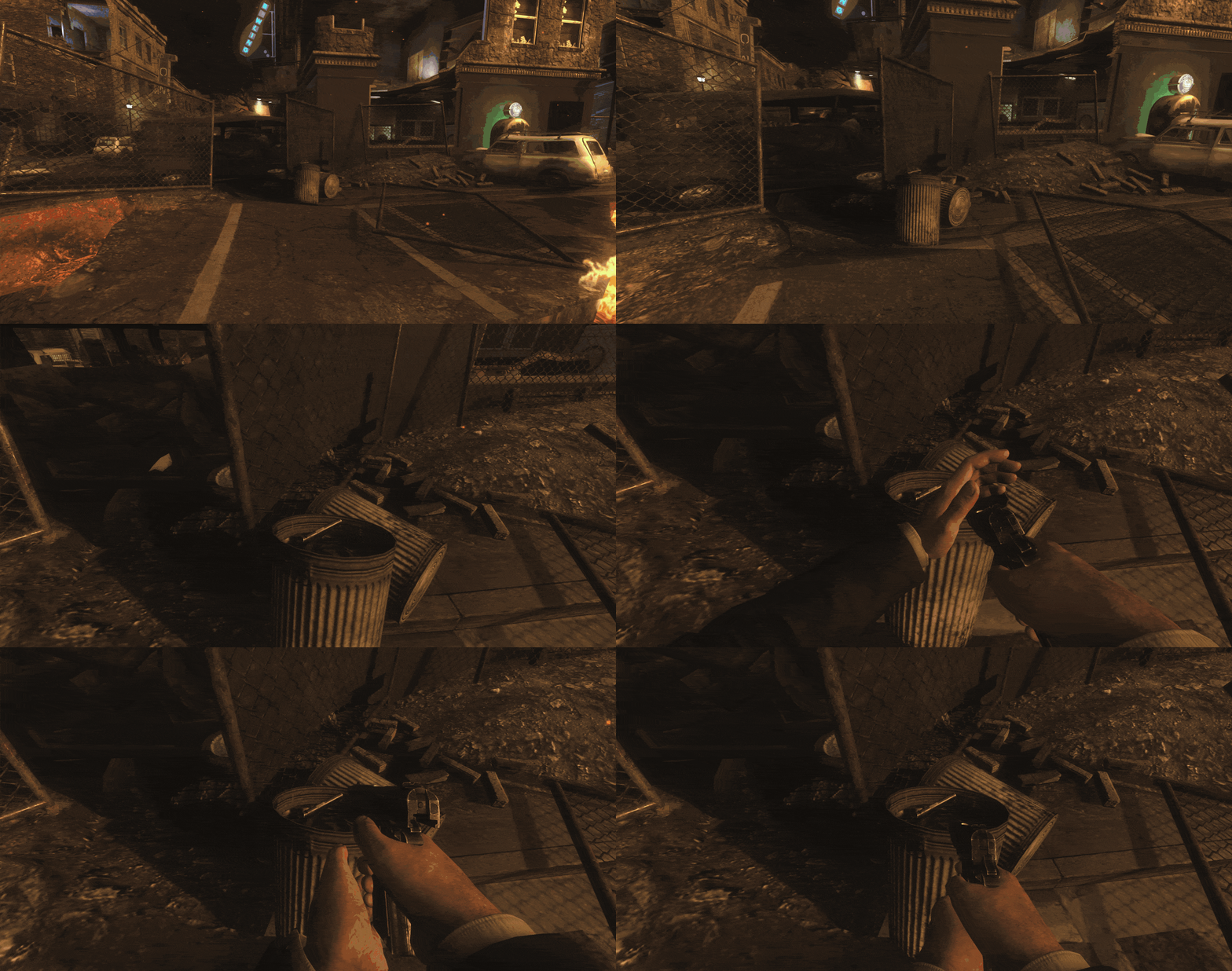
[Release] [ZM] Grabbable Starter WeaponAfter sitting a bit thinking of what random thing I can make, I thought of adding some sort of Survival Realism where you spawn in with no gun and will have to find the pistol thats lying around or waste points for a gun.
Nothing too big.
Wanted to make it so you have the ballistic knife but some maps dont have it natively so I decided to just run with empty hands.
Compiled: https://github.com/techboy04/Starter-Weapon-Grab-T6Zombies/blob/main/starterweapongrab.gsc
Source: https://github.com/techboy04/Starter-Weapon-Grab-T6Zombies/blob/main/starterweapongrab_sourcecode.gsc

This mod also appears in a collection of my other mods! Check out TechnoOps Collection!
-
T6 downloadno link exists, buy it on steam.
-
Alternate Xbox 360, PlayStation 4 and 5 controller support guide (Steam Controller Configuration)Alternate Xbox 360, Playstation 4, and 5 controller support guide
DS4Windows method not working for you? Or you hate it for what ever reason? (welcome to the club). Well welcome to this guide on another way of getting your Xbox 360 or PS4/PS5 controller working without some random exe! This can also work on Linux (tested on Steam Deck)!
Note, not sure if it works on Nintendo's controllers but the method should still be the same, if it is, lmk and I can edit to fit which controllers worked.
This guide is also assuming you are only opening the launcher but if you were to launch each game individually (like launching in LAN mode on Steam Deck), then every time Plutonium.exe is mentioned, then its the Plutonium-bootstrapper.exe)
Requirements:
- Steam
- Know where your Plutonium.exe is located
- Your Xbox 360 (with wireless receiver or wired adapter), DualShock (PS4) or DualSense (PS5) controller
1. Connecting the controller
Make sure your controller is connected, whether its wirelessly or wired. Both methods should work.
Make sure your computer recognizes it as a controller.2. Check if Steam recognizes it
This is important, make sure Steam recognizes your controller. One way to do it is go in the Settings on your Steam client.
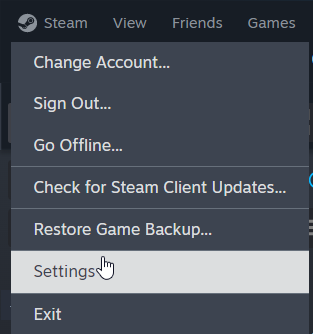
Scroll down to Controller and youll see whats connected.
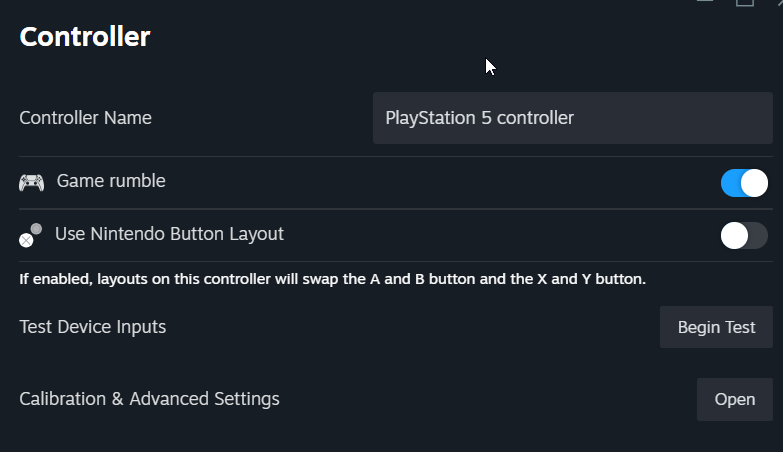
If youre unsure if its your controller, you can click on Begin Test and test your buttons.Optionally you can enable PS Controller Support if youre using a Playstation Controller but it will work regardless (I assume this option enables stuff like the trackpad and gyro)

If you're using a Playstation 5 controller and it doesnt detect it, but its recognized as a controller everywhere else, then try updating the controller firmware via Playstation Accessories App
(Thanks to Resxt for this)3. Add Plutonium.exe as Non Steam
In order for Steam to integrate your Controller into the games, you'll need to add Plutonium.exe as a Non Steam game.
To do this you'll first need to find Add a Game on the bottom left of the Steam Client and click on Add Non Steam Game

After, this dialogue will open up. This will list any potential software's in your system that you can add as a Non Steam game. Here you'll look for Plutonium.exe.

If you can't find it, click on Browse.
File Explorer will open and you must find where your Plutonium.exe is located.
Note yours may be different.
Once you do, click on it once and click Open.
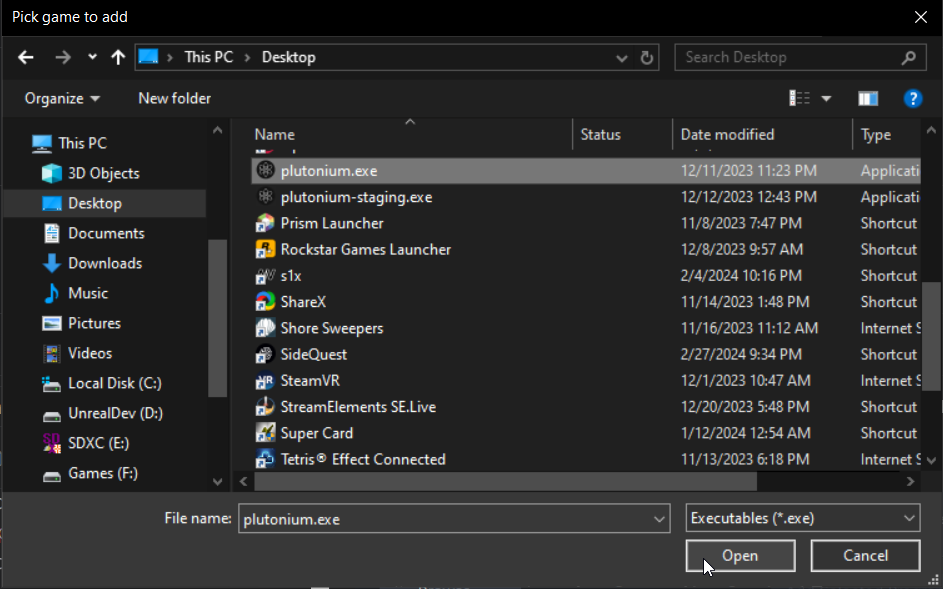
Plutonium will now show up on the list.
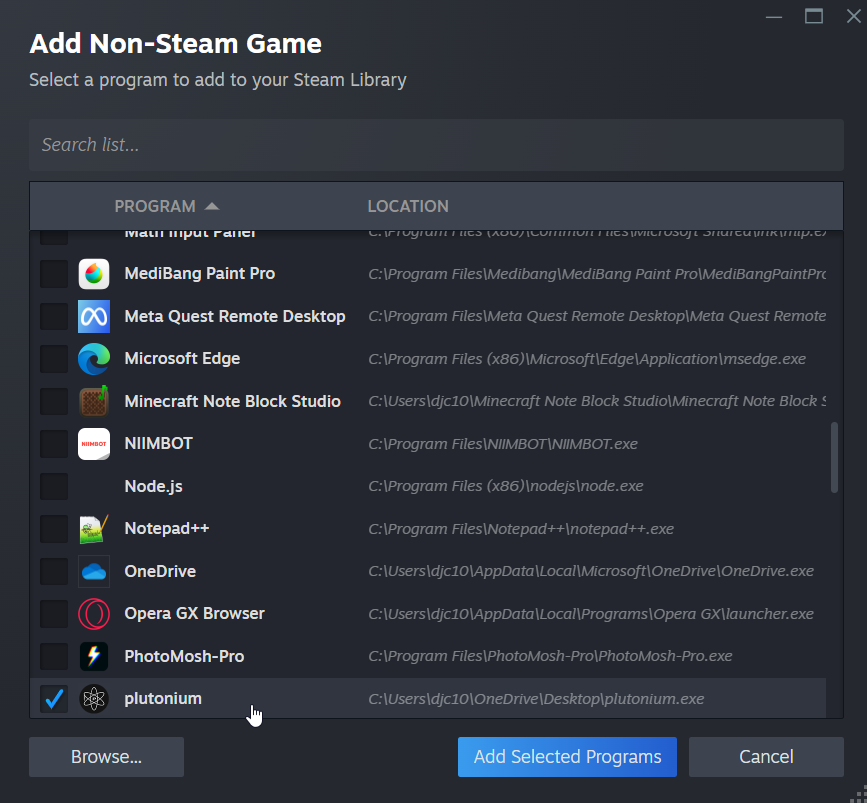
Then click the big blue Add Selected Programs.
Plutonium should now appear in your Steam library

3.5 Enabling Steam Input for the launcher
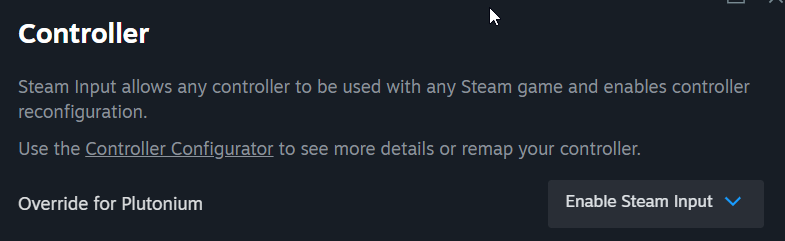
Ensure that Steam Input is enabled for Plutonium.
You'll need to go into the games Properties
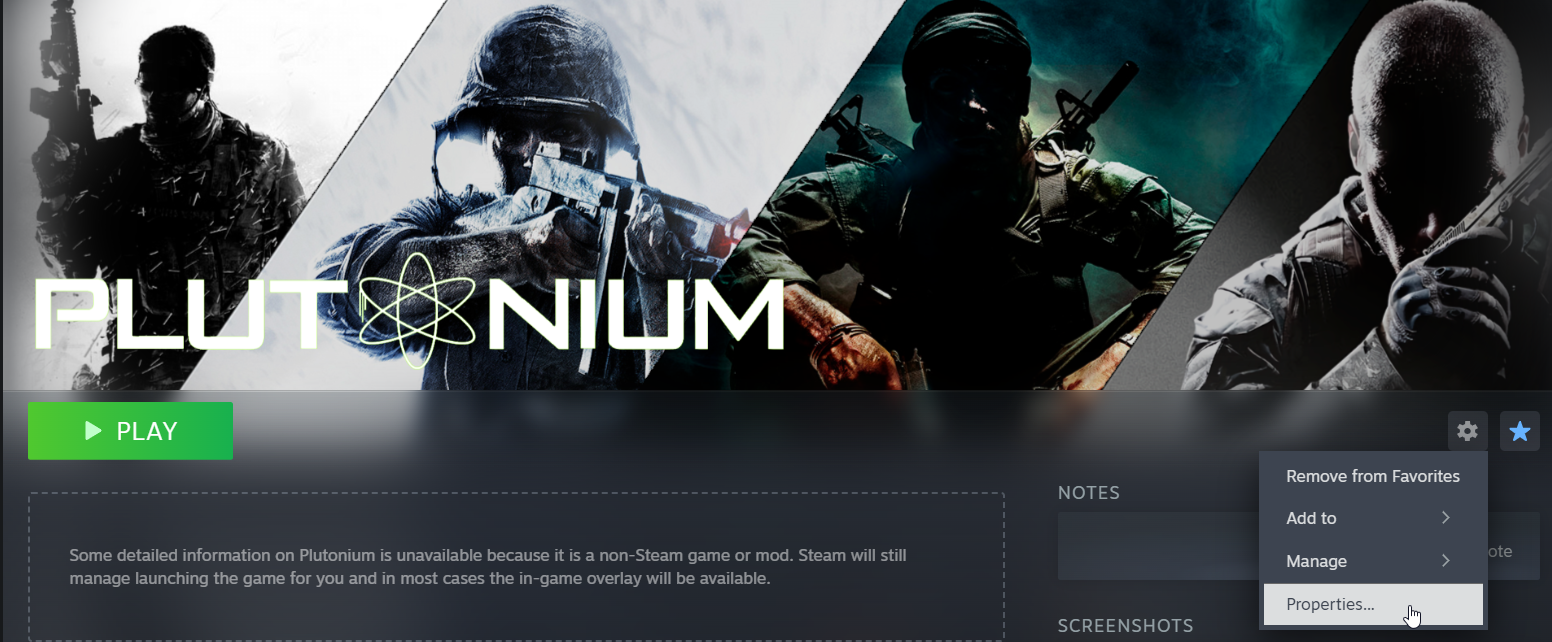
In the Controller tab, check on Steam Input and ensure its Enabled.
4. Open the game!
The game is added! Press play and it should open the launcher!
Now note, your controller will not work unless its a game with gamepad support. (Black Ops 2 should have full gamepad support while World at War and Black Ops 1 has very limited)
The controller will not work on the launcher.To check if your controller is hooked in, press the PS button and it should open the Controller Configuration and should show your controller.
In order for your controller to work you must run Plutonium through steam every time!
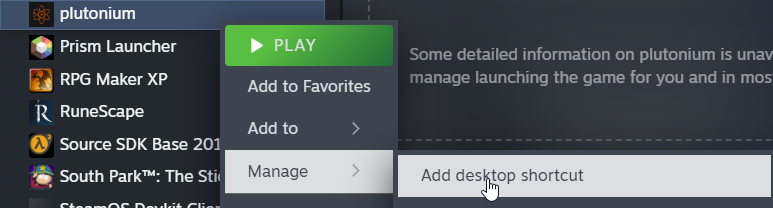
Optional: Add a Desktop shortcut
This may involve you to move your Plutonium.exe shortcut to avoid accidentally opening the wrong one.
IF you move your exe, you'll need to relocate where the launcher is.
Right click Plutonium in your library, click on Properties.In the Target area, click on Browse and find where the new Plutonium.exe is located.
On the Plutonium name on your library, right click, and click on add Desktop Shortcut. This should just add the shortcut on your desktop.
Conclusion
Congratulations! You've avoided DS4Windows!
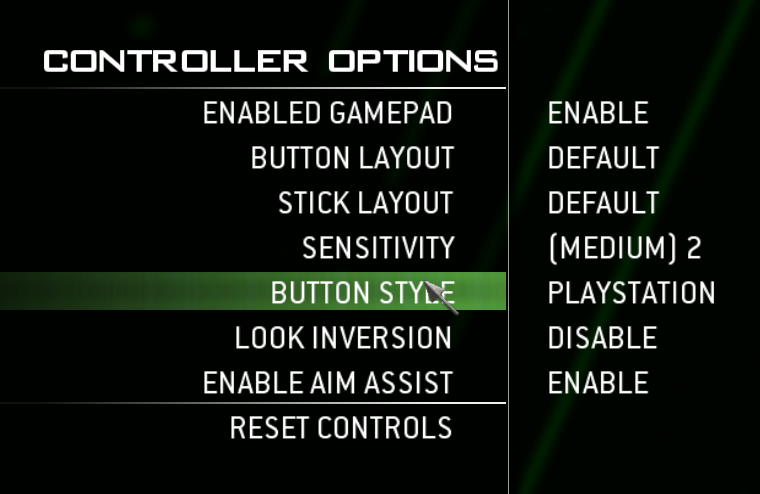
Steam has improved controller compatibility with non Xbox controllers immensely over the years and luckily today its pretty much fully functional with very minimal issues.Also in-game, the icons will show as Xbox, you'll have to find the PS icons for each game: (I will update as I find more)
- World at War: N/A
- Black Ops 1: https://forum.plutonium.pw/topic/28975/release-bo1-playstation-dualshock-4-button-prompts-mod (alternative if needed)
- Black Ops 2: https://forum.plutonium.pw/topic/7511/release-playstation-controller-ui-buttons-for-t6?_=1709532430732
- Modern Warfare 3: An option in-game

-
[Release] [ZM] Rampage Statue - Based off of Cold Wars Rampage InducerNew Update
This mod has been updated with changes found in TechnoOps Collection
Changes include:
- Added a vote menu
- The maps wonder weapons will not be rewarded (Origins will cycle staffs)
- Fixed broken text near statue
-
[Release] [ZM] Useful NukeNew Update
This mod has been updated with changes found in TechnoOps Collection
Changes include:
- Fixed a bug where not everyone got the points
-
[Release] [ZM] Global ATMNew Update
This mod has been updated with changes found in TechnoOps Collection
Changes include:
- Changed Interact behavior to properly function
-
[Release] [ZM] Exfil SystemNew Update
This mod has been updated with changes found in TechnoOps Collection
Changes include:
- Made the icon Blue instead of Green
- Added a vote menu
-
[Release] [ZM] Secret Music Easter Eggs in Survival mapsNew Update
This mod has been updated with changes found in TechnoOps Collection
Changes include:
- Made the secret song per player instead of per game (like it is normally)
-
[Release] [ZM] Infected Mechanic (From AW Zombies)Another month, another mod.
This mod gives the Infected mechanic from Advanced Warfare Zombies.
After a certain round (configurable but by default its 15), zombies that hit you with a chance (also configurable but default is 60%) you will be infected.
You must go to a skull that cures you with a cost.
When infected, the timer counts down, the more hits you get, the quicker the timer counts down. When time reaches zero, you are downed.This mod is also customizable, you can adjust the round in which the Infected mechanic starts, the chance of being infected, the price for the cure skull, the max time that counts down, and the amount that goes down whenever the player gets hit while infected.
Compiled GSC: https://github.com/techboy04/Infected-T6Zombies/blob/main/infected.gsc
Source code: https://github.com/techboy04/Infected-T6Zombies/blob/main/infected_sourcecode.gsc -
[Release] [ZM] Vanguard Perk HUD AnimationXeratone Strange, try using the source code version, it doesnt have that. Plutonium compiles it while youre loading a game.
-
[Release] [ZM] TechnoOps Collection
TechnoOps Collection
A massive collection of scripts and mods I made over the years of making mods!
This mod idea was heavily inspired by Reapers Collection on Black Ops 3.
The mod includes:
- Exfil - Finish the match with style! Similar to Cold War + Black Ops 6.
- Rampage Statue - Similar to the Rampage Inducer but cant be disabled, zombies always run and there is no round delay.
- Gobblegums - Utilize Gobblegums in Black Ops 2!
- Global ATM - Allow players to share points to one public bank.
- Infected (Disabled by Default) - Similar to Advance Warfares Infection mechanic where players get infected randomly when damaged and can be cured by touching the cure skull
- Custom Game options to customize your experience. Through Custom Game menu and Dvars!
- Instant Pack a Punch - Upgrading is instant. No need to wait!
- Points underneath Perks - Crouch to get extra points underneath perk machines.
- Mod Quests currently available in Tranzit and Nuketown.
- zm_weapons and zm_perks integration from sehteria
Lightweight Features
- Health Bar
- Shield Bar
- Enemy Counter
- Hitmarker w/ Customizable sounds
- Secret Music for Survival Maps
- Zone Notifier - Shows the name of the area the player is in.
- Compass - Shows the players direction, current zone, and angle.
- Grabbable Starter Weapon - Ability to pickup the starter weapon instead of spawning with it.
Powerup and Perk Changes
- Bonus Points is on all maps.
- Max Ammo fills the magazine aswell.
- Nuke gives points per zombie killed.
- Carpenter repairs shield.
- Mulekick saves and retrieves the third weapon between downs.
- Doubletap gives faster mystery box spins and buildable repairs.
- Speedcola lets players perform actions quicker like swapping weapons.
- Staminup gives unlimited sprint.
There are also SOME map specific things aswell! (Not alot)
Tranzit:
- Fast Travel - Quickly teleport around the map.
- Better Power - When the power turns on it will open Pack A Punch along with any other power required doors.
- Toggleable fog and denizens - Be able to remove or keep the infamous fog and denizens.
- Jetgun has unlimited ammo - Jetgun doesn't go kaboom. Making it more fun to use.
- Ability to remove Lava damage
- Wall Weapon present in Town
- A ladder to travel from Town to between Diner and Farm
- Additional ladder placed in Diner to galvaknuckles
- Jetgun can be picked up by everyone
- A bunch of secrets
Origins:
- Toggleable Mud effects - Change whether you want to keep the mud movement or not.
- Removal of early voice lines from Samantha
- Right foot of Robot always open regardless if the hatch is opened or not
- Removal of recapture rounds
Nuketown:
- Perks Management - Choose how you want the perks to drop, from its normal behavior, every round, every time the bell chimes, or even all at once!
Mob of the Dead:
- Cat has 9 lives integration
- Afterlife doesnt down when mana expires, similar to the Beast from Shadows of Evil
Want a little fun? Try out our four gamemodes!
- Gun Game = Advance through the gun ladder by getting a certain amount of kills to progress, be the first to go through the entire ladder to win. Downs will demote you.
- Cranked = Survive as long as possible with a ticking time bomb that resets with every zombie kill, as the rounds progress, the max timer will being to shrink.
- Mystery Guns = Guns randomize after every round.
- Dead Light Green Light = Based off the Black Ops 6 LTM, players get double points during green light, upon red light you have to freeze aswell as getting no points, if you move, you get a punishment.
- Sharpshooter = Get a random gun every few seconds.
- Team Cranked = Similar to regular Cranked but the timer is shared.
- Zombie Snacks = Health doesnt regen and drops slowly, zombies drop energy to replenish health.
Configuration
The mod by default has preset settings but important settings can be changed via the Custom Games menu. All other settings are also configurable via the console. Both methods will save the choice for the next time you relaunch the mod. For a list of dvars, check out the dvar section of the wiki!
Try before you download!
Want to see how this script is played before downloading it? We have servers that host the script along with some extra features and maybe even early access to future updates! Just look up TechnoOps Collection on Plutonium T6 Zombie's server browser!
Download
How to install:
Mod (Recommended)
- Download the zm_technoopscollection.zip from the latest release via https://github.com/techboy04/TechnoOps-Collection/releases
- Place the .zip inside your
%localappdata%/Plutonium/storage/t6/mods/
If the folders dont exist, create them. - Extract the zip, MAKE SURE that the zm_technoopscollection FOLDER is in the mods folder so the structure should be
mods/zm_technoopscollection/mod.ff - Go to the Mods section on T6 Zombies and select the mod!
Scripts only! This is an older method but here incase you use a v1.X of the mod!
- Place the compiled or source script (along with the zm_transit folder if you want Solo Tombstone) in your scripts folder!
%localappdata%/Plutonium\storage\t6\scripts\zmCredits
Logical Reaper - Mod Inspiration from Reaper Collection
Resxt, Bandit, afluffyofox, hinder, ZECxR3ap3r, Jezuz, and 2 Millimeter - Helping me throughout development of this mod and the other mods
JBleezy - Helped with Lua related stuff -
[Release] Mob of the Dead Mod: "A cat has 9 lives"This script may be a little outdated so I decided to update it myself

Actually nothing is changed besides a proper HUD to show the lives... thats overlapped on the Afterlife logo ingame. So it aint perfect but aye, it shows the HUD and it works with the modern way Pluto uses scripts
https://github.com/techboy04/9Lives-PlutoniumT6 -
[Release] [ZM] Secret Music Easter Eggs in Survival mapsI play alot of Survival for easy testing, and I noticed something was off, wheres the Teddy Bears? I looked seeing if there was any for the secret music easter egg and noticed there was nothing. So I decided to whip up a quick script that adds just that!
Each Green Run Survival map has 3 Teddy Bear locations.
If you want to know where the bears are located feel free to check out this page in the wiki.Download: https://github.com/techboy04/MusicEESurvival-T6/blob/main/secretsongsurvival.gsc
-
[Release] [ZM] Global ATMResxt This was inspired by the ATM from Infinite Warfare's Zombies in Spaceland.
-
[Release] [ZM] Exfil SystemI've honestly had this in the backlogs for awhile, thought I released this, whoops lol.
Anyways here is an Exfil system that's similar to Cold War and Vanguard.
If you want to collectively end a match, you can!
Every 5 rounds after round 10 exfil will be available and it'll be open for a limited time (similar to Cold Wars)
Every map has its own timeframe during the Exfil process to make it fair and balanced. (Tranzit is longer than Nuketown)Once exfil is available you'll be able to see a green revive icon aswell as it showing in the exfil escape location.
I've also decided to be a little creative and tried to make this Exfil work with the zombies lore as best I can (Wouldn't make sense to have a random Helicopter right? lol. That is if you can spawn a heli in bo2s engine lol)
To download, pick the preferred file of the version. (zip = mod, gsc = script)
https://github.com/techboy04/Exfil-T6Zombies/releases
-
[Release] [ZM] Global ATMI was playing a few games of Zombies in Spaceland and thought about making an ATM in Black Ops II. Not sure if it already has a similar feature in Victis maps but I decided to add it for all maps.
The ATM lets you deposit your points into a bank that other players in the match can also access.
This is beneficial if you have alot of points and a player has to respawn and in need of a boost or a player joining really late into the game.
The locations of each ATM are easy to find but are documented in the github page.
Compiled GSC: https://github.com/techboy04/GlobalATM-T6Zombies/blob/main/globalatm.gsc
Source Code: https://github.com/techboy04/GlobalATM-T6Zombies/blob/main/globalatm_sourcecode.gsc
-
[Release] [ZM] Vanguard Perk HUD AnimationAround the time of Shi No Numa Reborns release I had an idea of making a HUD animation for when you grab a perk for Bo2 Zombies.
So I decided to make just that!
Its a nice simple little thing that I hope you enjoy using!
Shoutout to 2 Millimeter for helping me with the perk check and JezuzLizard for helping me with HUD scaling!
Compiled GSC: https://github.com/techboy04/Vanguard-Perk-HUD-Anims-T6Zombies/blob/main/vgperkhudanims.gsc
Source Code: https://github.com/techboy04/Vanguard-Perk-HUD-Anims-T6Zombies/blob/main/vgperkhudanims_sourcecode.gsc
-
[Release] [ZM] Instant Pack A PunchHave you ever been downed because the Pack A Punch took an extra second to pop out your gun? Or youre in a rush and want to upgrade your gun?
Or do you just like a quick upgrade that Cold War and Vanguard hadWell introducing... drum roll please.... you already read the title... Instant Pack A Punch!
On this mod the pack a punch process happens in an instant! No waiting and no worrying about losing your valuable weapon!
Compiled GSC: https://github.com/techboy04/Instant-PAP-T6Zombies/blob/main/instantpackapunch.gsc
Source Code: https://github.com/techboy04/Instant-PAP-T6Zombies/blob/main/instantpackapunch_sourcecode.gsc